
Living and Learning: Safer Internet Day
On Tuesday it was Safer Internet Day. The theme for this year’s national Safer Internet Day is ‘Smart tech, safe choices – Exploring the safe and responsible use of AI.’
Our first lesson was about misinformation, disinformation and hoaxes. The children were given 3 news articles to analyse and summarise. They then had to share this information with their friends over message. What they didn’t know is that these articles were hoaxes (false information made to deceive people). I shared this information with them on purpose (disinformation) and they had then shared it by accident (misinformation).
Year 5 discussed how we must be critical users of the internet to make sure false information is not spread to affect others.
I would check different websites to see if the information was correct.
I would check for spelling mistakes and other errors.
I would look at the URL to see if it is a safe and reliable website.
It’s really important to always speak to a trusted adult if you’re unsure about something you read online.
We spoke about our conduct online as well. We know that we need to be respectful, responsible and kind in all our online interactions. Essentially, we need to treat people online with the same respect we would to their face. If we hear or read anything that upsets us we need to report it to a trusted adult.
Help at home: Can you think of at least 4 pieces of personal information that we should keep private? How can you be critical users of the internet?
Living and Learning – Safer Internet Day.
On Tuesday of this week we had our Safer internet day, Year 1 learnt about four main areas of online safety (plus lots of other online safety tips too).
- I know that there are sometimes age restrictions online.
- I know that passwords are important.
- I know that some things online may not be true.
- I know that I shouldn’t share personal information online.
We also welcomed Dave from d:side last week to support this learning last week.

We’ve had lots of discussions about staying safe online. We read the book Chicken Clicking by Tony Ross. In the story a chick gets access to the farmer’s computer and makes a chick friend online. He goes to meet his new friend in the woods… I’ll let your children tell you what happens next.

The children shared some great ideas giving Chicken Clicking some superb advice about how he should have acted differently.
Finally, well done for another great half term Year 1! Have a lovely break.
Spring 1: Week 6
This week, we’ve been learning all about Lunar New Year. Our focus story was The Magic Paintbrush by Julia Donaldson. Using our imaginations, we thought about what we would create if we were given our very own magic paintbrush.
 On Wednesday, we watched a video about how people prepare for and celebrate Lunar New Year.
Yesterday, we read The Great Race and learned about how the Chinese Zodiac began. We then had a go at putting the animals in the correct order.
 Maths
We’ve been exploring pattern. The children have been copying and continuing patterns, as well as creating their own, using patterns like AB, ABB and ABBC with colours, shapes, actions and objects.
We’ve also been spotting errors in patterns and explaining what has gone wrong. This helps children really think about how patterns work, rather than just guessing. A key focus has been talking about the ‘unit of repeat’ – the part of the pattern that keeps repeating (for example, red–blue in an AB pattern).
Help at home: Choose a rule and create a pattern. Take a picture of your pattern and send it to the Reception email address.
 Finally, thank you to everyone who attended the parent–teacher meetings this week. It was lovely to talk with you all about your child’s learning and to celebrate their fantastic progress.
As always, I hope you all have a happy and healthy half-term break. Feel free to send me an email to let me know what you get up to. I look forward to seeing you all again on Monday 23 February.
Trip to Yorkshire Museum!
Yesterday, Year 3 and 4 were lucky enough to visit Yorkshire Museum. This trip linked brilliantly to our History topic – Romans and Anglo-Saxons.
Before lunch, we had plenty of time to explore the museum exhibits. In Year 3, your children learnt about rocks and fossils in Science so the Jurassic exhibitions were a clear favourite in our class! We loved dressing up as Romans, spotting Latin words we recognised from our lessons and getting up close to swords and helmets discovered by archaeologists.
After lunch, we continued the fun with a Roman workshop. We learnt and played a real Roman board game and had a chance to hold some Roman artefacts that were around 2,000 years old!
We had a fantastic day exploring the museum and stayed safe by listening, staying close to our adults and walking in pairs.


Help at home: ask your child one new fact that they learnt while at the museum.
Trip to the Yorkshire Museum
Year 3 and 4 visited York to go to the Yorkshire Museum and to see the flood defences (in action).
Yorkshire Museum had exhibitions that were perfect for us to link to our History and Science learning; Roman York and Mary Anning Rocks and Yorkshire’s Jurassic World!
Here’s some pictures of us exploring and learning about the artefacts.


We also took part in a Roman workshop which recapped lots of the information we’ve learnt over our History topic.


Our second reason for visiting York was for the flood defences. York gets flooded quite easily after periods of heavy rainfall so they have built many flood defences around river to help the houses and buildings near. We’ll be learning about this during our Geography topic after the Easter holidays.
To no surprise, there were floods when we visited! Here’s what we saw:


We made sure to stay safe while walking through York and around the river by walking in pairs and behind the railings.
Help at home by asking your child one new fact that they learnt while at the museum! For example, I learnt about the different under water dinosaurs that existed millions of years ago.
Basketball half term holiday camps
There are the last remaining places available on these half term City of Leeds Basketball Club holiday camps held locally at Allerton High School.

Living and Learning: Safer Internet Day
Today, it was Safer Internet Day and we spent the day focusing on these two key areas of online safety.
- I know that some things online may not be true (people and information).
- I know that I shouldn’t share personal information online.
We used some different texts to support this learning and our daily poem too.

We thought about some questions to ask Chicken Clicken and then did some hot seating. This helped us to think about Chicken Clickens feelings and actions.


This video also reinforced key messages about not everything online is true (this could be people or information) and the importance of not sharing any of your personal information.

We used our Living and Learning statement to think about the importance of always being respectful.

People should be respectful online because if you aren’t, others won’t be respectful to you.
It’s like bullying if you keep doing it.
It’s just like saying something mean in real life and we wouldn’t do that.
It can hurt other peoples’ feelings.
Dave from d:side visited last week to reinforce lots of internet safety messages. He was very impressed with the knowledge and understanding from the children.

Throughout this learning, we reinforced the message that if the children were unsure or something didn’t feel right they should always Start Telling Other People and let a trusted adult know.
Help at home: Can your child tell you the key messages from the texts we read?
Finally, our online safety section has further support available for parents.
Internet Safety Day
Today we’ve been talking about internet safety and how to make smart choices online. Our friend Smartie the Penguin helped us learn what to do if something unexpected pops up on a screen.

While using his tablet, Smartie saw something that didn’t look right. Instead of clicking it, he remembered TAG — Tell A Grown up. Smartie told a trusted adult straight away.
 We learned that if we ever see something that’s not meant for us online, we should TAG (Tell A Grown up). Telling a grown-up helps keep us safe and makes sure we can enjoy using technology the smart way — just like Smartie the Penguin!
Here’s a video with advice on how to support children up to age 5 to stay safe online.
Living and Learning: Online Safety Day
We started off Safer Internet Day with an assembly.
Then, we had a lesson about misinformation, disinformation and hoaxes. Misinformation means sharing false information by accident. Disinformation means sharing false information on purpose. A hoax is false information made to deliberately deceive. The children discussed how to be critical users of the internet:
- check URLs
- research/check information with other sources
- don’t believe everything you read
- read the whole thing and not just part of the information
We also focussed on understanding the importance of checking with a trusted adult before sharing personal information.
Last week, we were also joined by D:Side Dave who talked to the children about everything social media and staying safe online. Did you know that on average, people spend 2 hours and 24 minutes online everyday? Did you know that over 2 million snapchat ‘snaps’ are shared every minute?
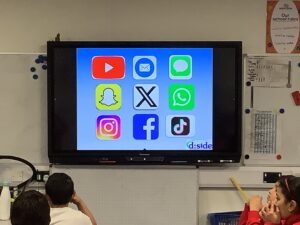
Help at home: Can you name all the different types of social media? What is the recommended ages for each one?
The children then went head to head with Dave to see if they could guess if these photos were real or AI. Have a go yourself!
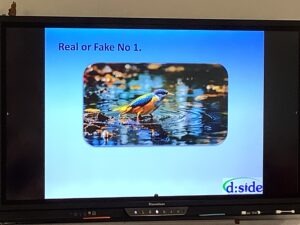
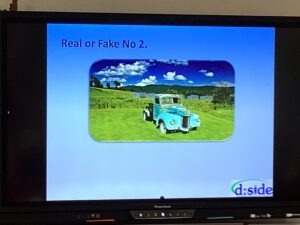
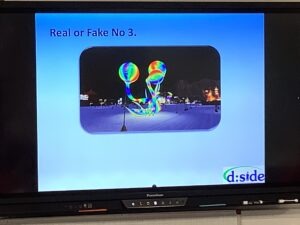

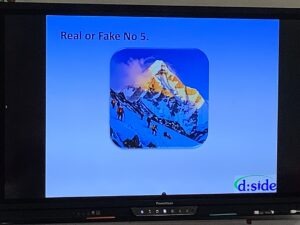
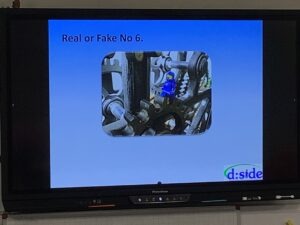
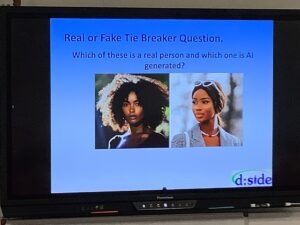
Dave spoke to the children about sticking to websites and games that are suitable for their age. We talked about the PEGI ratings on video games and how games with a higher age rating are not suitable for them.
Help at home: Discuss how to stay safe online and what your children should do if they see or hear anything that upsets or worries them.
Safer Internet Day!
Today is Safer Internet Day! This is a day designated to all things online safety.
In Year 4, we focused on some key elements of online safety:
- Fake news
- Sharing personal information
- Respect online
We began by discussing fake news and how we can spot it. Not everything we read online is true and we must make sure we don’t trust everything we read. Fake news can either be spread accidentally or on purpose:
- Disinformation is when people spread false information deliberately to trick others.
- Misinformation is when people share false information by mistake, thinking it’s true.

Questions we can ask when deciding if an information source is trustworthy:
- Who’s written it?
- Do they have a good reputation?
- Why has it been written?
- Is it opinion or fact?
- Is it high quality?
It’s really important to always speak to a trusted adult if you’re unsure about something you read online.
Help at home: ask your child how they can spot fake news.